Easy Text & Voice Translator
- 4.3
- Rating
- 1.00M
- Installs
- Free
- Price
 Analysis by App-foxy
Easy Text & Voice Translator is the kind of small utility I reach for when a language barrier appears without warning. I tested it as a quick translation tool rather than treating it like a full language-learning platform, and that distinction matters. Its purpose is speed: after a call or during a text-based exchange, it aims to help me understand and respond without opening a complicated workspace. The app is free, rated for Everyone, and made by DreamCups, so it is easy to recommend as a low-commitment tool for travelers, multilingual families, and anyone who occasionally needs help with another language.
My overall impression is positive, but practical rather than enthusiastic. The appeal is not a long list of advanced language features. It is the reduced friction between seeing or hearing something unfamiliar and getting a usable translation. That makes it especially handy in short, real-world moments: checking a message from a customer, understanding a delivery update, or preparing a reply while speaking with someone abroad. At the same time, I would not treat it as a replacement for a professional interpreter, a carefully edited translation, or a dedicated learning app.
How Easy Text & Voice Translator fits into everyday use
I find this app most useful when a translation need catches me mid-task, because the section that follows looks at how its focused design fits quick, everyday exchanges. I’ll also consider the small preparation choices that can save time later, especially when I’m switching between text and speech.
You May Also Like

 Blood Strike: 2.5 Anniversary
Blood Strike’s Loadouts Turn Every Drop Into a Tactical Gamble
A close look at Blood Strike’s custom loadouts: how fast access to signature weapons reshapes its battle royale rhythm, rewards preparation, and narrows the gap between fights.

 Pandora - Music & Podcasts
Pandora’s Music Is Easy to Start, but Harder to Recover
Pandora’s strength is its low-effort path from a seed to a station. Its weak spot is how much confidence it asks you to place in connection, setup, and quiet recovery.

 8 Ball Pool
 Is Built on Rivalries, Rematches, and Routine
A close look at the rivalries, rematches, shared routines, and unanswered safety questions that turn a quick pool match into a persistent mobile community.

 Samsung Music
’s Quiet Strength Is Playing What You Already Own
Its reach comes less from spectacle than from dependable access to a personal library. That simplicity is both the app’s strongest retention engine and its ceiling.

 AccuWeather: Weather Radar
AccuWeather Review: A Quick, Clear Forecast for Everyday Decisions
For everyday plans, the best forecast is the one you can understand quickly. AccuWeather makes rain timing, radar, and local conditions easy to act on, with a few trade-offs.

 Hill Climb Racing
Why Hill Climb Racing Still Turns Crashes Into One More Run
A tiny car, a bumpy hill and one more upgrade: Hill Climb Racing keeps resurfacing because its simple chaos makes every near-miss feel personal.
More From Our News Desk



A focused tool for quick understanding
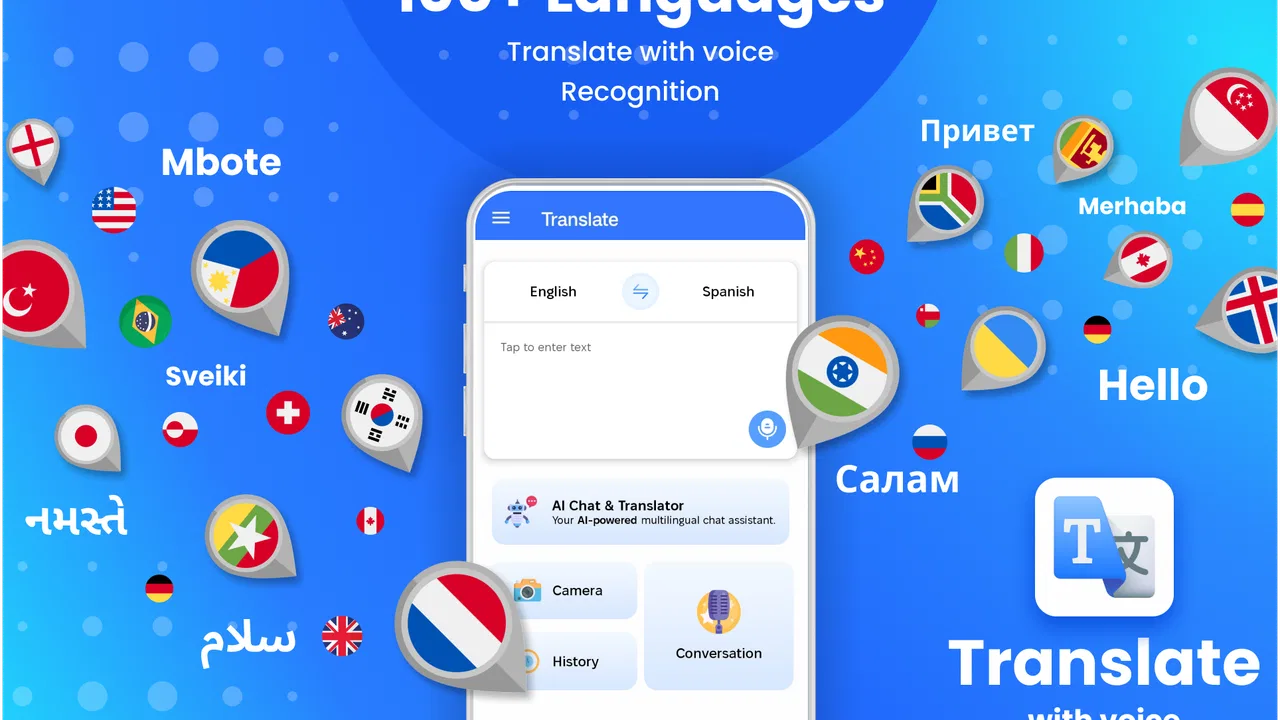
The app sits in the Tools category, and that is a good description of how I experienced it. I did not use it as a destination where I spent time browsing lessons or building a vocabulary list. I opened it when I had a specific problem to solve, selected the language context I needed, and focused on getting a readable result quickly. That focused design is its main advantage because translation is often most useful when it stays out of the way.
The text side is the easiest place to see its value. If I receive a short message in an unfamiliar language, I can use the app as a quick interpretation layer instead of copying the sentence into a browser, switching between tabs, and losing the surrounding context. This is also useful for short notices, simple instructions, and informal conversations where I need the general meaning more than a polished literary rendering.
The voice angle makes the app more relevant during live situations. A spoken exchange can be difficult to manage when I am also trying to type, copy, and paste. A translation tool built around quick input can reduce that juggling. In my experience, the best use is a short sentence at a time: ask one clear question, let the app process it, then confirm the response before moving on. That workflow is more reliable than trying to push an entire fast conversation through a phone.
One realistic scenario where it earns its place
Imagine arriving at a rental apartment in another country and receiving a message from the host about the entrance procedure. The message may contain a door instruction, a meeting detail, or a request to contact someone. I would use Easy Text & Voice Translator to get the main meaning immediately, then translate my short reply back into the other language. The important benefit is not just translation accuracy; it is keeping the exchange moving when standing outside with luggage is not the time to learn a new interface.
A similar situation can happen at work. Suppose a small business receives a short inquiry from an international customer. I can first translate the request to understand what the person wants, then create a concise response rather than attempting to translate a long paragraph full of ambiguous wording. This is where I found a useful rule: short, plain sentences usually produce more dependable practical results than dense messages. The app helps with the language step, but I still need to make sensible decisions about tone and meaning.
What the current release tells me
The current version is 1.3.9, and the product has been available since July 6, 2023. Those details place it beyond the earliest launch stage, while still making it a relatively focused utility rather than a mature all-purpose communication suite. I see that evolution in the way the app’s purpose is easy to understand: it concentrates on getting translation help into a quick interaction instead of surrounding the core task with unrelated extras.
Its public reception also suggests that the basic idea has found an audience. It has a 4.3 average from around 7,600 ratings and more than one million installs. I would not use those figures as proof that every translation is perfect, but they do indicate that the app is not an obscure experiment. The number of ratings and reviews gives me more confidence that ordinary users have tried the central workflow and found enough value to keep it installed.
For someone deciding whether to try it, the practical point is simple: the app is free, so the barrier to testing it is low. It is compatible with operating systems from version 11 onward, which covers many relatively modern phones but still matters if you are using an older device. The Everyone age rating also makes it suitable for general household use, although younger users should still be shown how to check translations rather than accepting every result automatically.
How it compares with the usual alternatives
The obvious alternative is a large, familiar translation service accessed through a browser or a general-purpose translation app. Those services may be preferable when I need a broader collection of language tools, more context around a phrase, or a translation history that supports a longer project. They can also be better when I want to compare several interpretations or investigate why a sentence translates a certain way.
Easy Text & Voice Translator makes more sense when speed and simplicity matter more than depth. I would choose it for a quick message or a brief spoken exchange, especially when I do not want to navigate through a large ecosystem. That convenience has a trade-off: a focused interface may feel less useful when I need document-level editing, detailed language notes, formal terminology, or careful control over a complex translation.
It also differs from a language-learning app. Learning software is designed to help me remember words, practice grammar, and improve over time. This translator is designed to help me get through a communication moment. If my goal is to become conversational in Spanish, Japanese, or another language, I would pair it with lessons and regular practice rather than mistake instant translation for progress. It solves an immediate problem; it does not remove the need to understand the language eventually.
Small workflow choices that improve the experience
My first useful habit was to prepare the language direction before I needed it urgently. In a calm moment, I would check the selected input and output languages, then try a short harmless sentence. This avoids the common mistake of speaking or typing a full request only to discover that the wrong language pair is active. A quick test also shows whether the phone is recognizing my wording as intended.
For voice translation, I recommend speaking as though you are leaving a clear voice note: moderate pace, short clauses, and a pause between ideas. Background noise, names, addresses, and local expressions are all difficult for automated systems. If the result looks strange, I would not immediately blame the other person or repeat the same sentence louder. I would simplify it, remove unnecessary politeness or slang, and try again.
For text, punctuation and sentence length make a surprising difference. Instead of entering “Could you possibly let me know whether there might be a chance that the appointment has been moved,” I would write “Has the appointment moved?” The shorter version is easier to verify and easier for the other person to answer. This is not a special button or hidden setting; it is a workflow advantage that becomes clear when using a fast translator in real conversations.
Another useful approach is to translate in both directions when the message matters. I can translate an incoming sentence, write a short reply, and then translate my reply back into my own language to check whether the intended meaning survived. This back-check is not a guarantee of correctness, but it can expose an accidental change in tense, a missing question, or wording that sounds much stronger than I intended. I find it particularly worthwhile for addresses, appointment arrangements, and customer communication.
Where the app still needs care
The biggest limitation is shared by almost every instant translator: a readable result is not always a precise result. Idioms, humor, regional expressions, technical vocabulary, and emotional tone can all be flattened. A sentence may be grammatically understandable while still sounding unnatural or carrying the wrong level of politeness. I would use the app confidently for orientation and simple exchanges, but I would ask a fluent speaker to review anything legal, medical, financial, or professionally sensitive.
Voice translation adds another layer of uncertainty. People do not speak in neat textbook sentences. They interrupt themselves, use names, change direction, and rely on gestures or shared context. A phone can help with the words it recognizes, but it cannot always understand what the speaker means. In a busy station, restaurant, or street, the practical result may require repeating the sentence or moving somewhere quieter.
There is also a human limitation that no interface can solve: both people need patience. If I pass the phone back and forth while entering long paragraphs, the conversation becomes slow and awkward. I get better results by agreeing on one idea at a time. The app works best as a bridge, not as an invisible interpreter that can manage a rapid, emotional discussion without assistance.
I would also skip it if my main requirement is advanced editing or long-form translation. A writer preparing a multilingual article, a student studying grammar, or a company handling specialized documents may need terminology controls, revision tools, and a more deliberate review process. In those cases, a larger translation platform or a human specialist is a better fit. The fact that this app is free is helpful, but free access should not be confused with suitability for every high-stakes task.
What existing users can expect from the present version
For existing users, the current release appears to preserve the straightforward identity that makes the app useful. If I already installed it for occasional text or voice translation, I would continue treating it as a quick-access utility rather than expecting it to become a complete language workspace. The most important benefit is consistency of purpose: open it, provide a short piece of language, inspect the result, and decide how to use it.
That also means expectations should stay realistic. A version number can show that the product has moved forward since its initial release, but it does not by itself promise perfect recognition, flawless context, or professional-grade output. I would judge each result on the situation. A rough translation of a casual message may be enough; a rough translation of a medical instruction is not.
New users should spend a few minutes learning their own best routine rather than immediately testing the app with a complicated conversation. Try a simple sentence, compare the translated meaning with what you intended, and notice how the voice input behaves in your surroundings. This short preparation makes the tool feel faster later because I am less likely to pause over language selection or wonder whether an unusual result came from my wording.
What I would like to see next
Looking ahead, I would watch for improvements that make conversations easier to verify, not merely faster to start. Clearer ways to review an exchange, identify the original wording, and notice uncertainty would be valuable. Translation is most trustworthy when I can compare input and output without losing track of who said what. Any future development should protect that clarity.
I would also pay attention to how the app handles difficult real-world conditions: accents, background noise, mixed-language sentences, and brief phrases that depend heavily on context. These are the situations that separate a convenient demonstration from a dependable travel or communication tool. Better handling would expand its usefulness without changing its simple character.
Another area worth watching is the balance between convenience and user control. A fast translator should not make me feel that I have surrendered judgment. Helpful language selection, easy correction, and transparent review would let me move quickly while still checking important details. That balance matters more to me than adding a crowded collection of features I would rarely use.
My recommendation after using it
I recommend Easy Text & Voice Translator to people who need occasional, immediate help with unfamiliar language and want a free tool that is easy to try. It is particularly suitable for travel preparation, short messages, casual conversations, and everyday situations where understanding the general meaning is the priority. The app’s focused nature is a strength when I need an answer now rather than a full lesson or document workflow.
I would not make it my only language resource, and I would not rely on an instant result for a high-consequence decision. Keep sentences short, speak clearly, check important translations in both directions, and involve a fluent person when tone or accuracy truly matters. Used with those boundaries, the app becomes a practical pocket assistant instead of a source of false confidence.
My final view is that DreamCups has built a useful tool around a common need: reducing the delay between encountering another language and understanding enough to respond. It is not trying to replace learning, editing, or professional interpretation, and I think it is better when judged on that narrower mission. If your typical translation needs are brief and spontaneous, I would install it and keep it available. If you need deep context, long-form control, or guaranteed precision, I would choose a more specialized alternative.
FAQs for Easy Text & Voice Translator
01What languages does Easy Text & Voice Translator support?
Easy Text & Voice Translator supports a wide range of languages, making it an ideal tool for global communication. It covers popular languages like Spanish, French, German, Chinese, and many more. The app frequently updates its language database, so users can expect even broader support in future versions.
02Is an internet connection required to use the app?
Yes, Easy Text & Voice Translator generally requires an internet connection to perform translations. This ensures accurate and up-to-date translations by accessing the most current language databases. However, some offline functionality may be available for certain languages with prior download of language packs.
03How accurate are the translations provided by the app?
The app utilizes advanced translation algorithms to provide highly accurate translations. While no translation tool is perfect, Easy Text & Voice Translator is consistently praised for its reliability. Users are encouraged to review translations for context, especially when dealing with complex or idiomatic expressions.
04Does the app support voice input and output?
Yes, Easy Text & Voice Translator supports both voice input and output, making it convenient for users on the go. You can speak into the app to translate spoken words into text, and it can also read translations aloud, aiding in pronunciation and comprehension for language learners.
05Is the app free to use, or are there any premium features?
Easy Text & Voice Translator offers a free version with essential features, but there are premium options available. The premium version may include benefits like an ad-free experience, access to additional languages, and enhanced translation features. Users can choose the version that best suits their needs.
Pros
- Supports multiple languages seamlessly.
- User-friendly interface for quick access.
- High accuracy in translation results.
- Offers both text and voice input modes.
- Offline mode available for basic translations.
Cons
- Occasional lag in voice translation.
- Limited offline language support.
- Ads can be intrusive at times.
- Premium features behind a paywall.
- Requires internet for full functionality.

Easy Text & Voice Translator
Gallery